
What Kind of Reporting System Is Suitable for Field Teams?
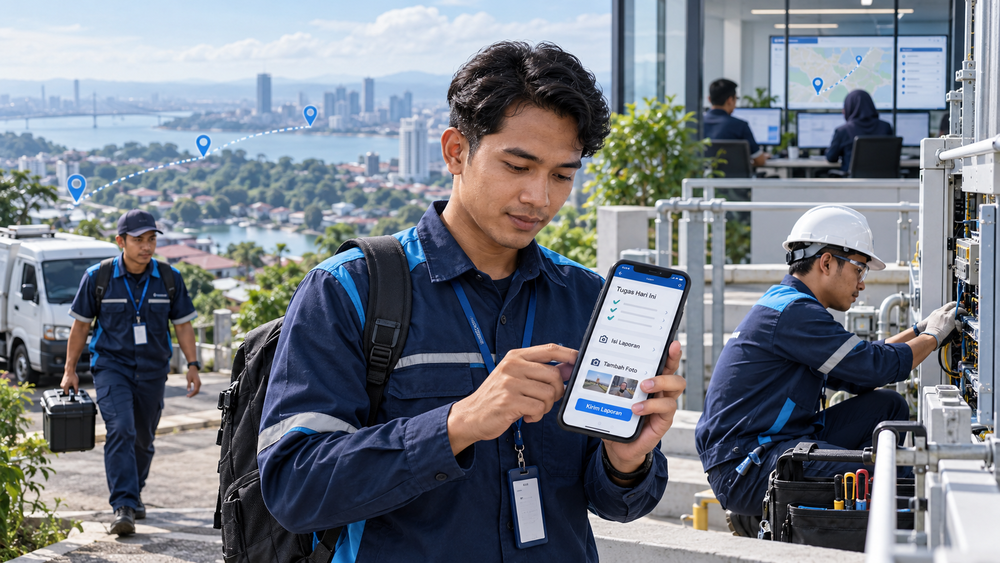
A suitable field team reporting system should:
- Be quick and easy to use.
- Be accessible through mobile devices.
- Support reporting when connectivity is limited.
- Provide customizable forms.
- Collect and validate proof of work.
- Connect data directly to a central system.
- Help supervisors monitor progress and follow-up actions.
These seven characteristics allow team members to complete reports as part of their work instead of treating reporting as an additional administrative task after field activities are completed.
Late or inconsistent reports are not always caused by a lack of discipline. Overly long forms, laptop-dependent access, repetitive data entry, and manual recaps can also disrupt the flow of information from the field.
Companies should therefore evaluate their reporting systems based on workflows, the devices used by field personnel, connectivity conditions, required evidence, and the information supervisors need to make decisions.
1. The System Must Be Quick and Easy to Use
A suitable system allows field personnel to complete reports through a few clear steps without disrupting their primary responsibilities.
a. Forms Contain Only the Required Information
Every field should support verification, documentation, follow-up, or decision-making. Fields that are never used only make the reporting process longer.
b. Available Data Does Not Need to Be Entered Again
Personnel names, customer details, locations, schedules, and task numbers should be retrieved from assignment data whenever the system supports it. This also reduces the risk of inconsistent entries.
c. Answer Options Are Practical
Checklists, dropdown menus, status options, and conditional questions can reduce manual typing without leaving out important information.
d. The Completion Flow Is Easy to Follow
Form fields should follow the order of the actual work process. Field personnel should not have to switch between pages or search for relevant fields while completing a task.
The following table can help companies identify reporting processes that need to be simplified.
| Process That Causes Delays | Impact on Field Personnel | More Practical Adjustment |
| The form is too long | Reports are postponed until the work is finished | Display essential fields and use conditional questions |
| Task data must be re-entered | Time is wasted and input errors may occur | Automatically populate fields using assignment data |
| Too many open-ended questions | Data is difficult to compare | Use checklists, dropdown menus, and status options |
| Reports are submitted through multiple channels | Information and evidence can become separated | Keep results and supporting evidence within the same task |
2. The System Can Be Accessed through Mobile Devices
A mobile-based reporting system allows field personnel to record results while the information is still complete and accurate, without waiting until they return to the office.
a. The Interface Is Comfortable to Use on a Smartphone
Button sizes, text readability, field order, and navigation should be optimized for smaller screens.
b. The System Does Not Depend on a Laptop
Field personnel should be able to open assignments, record results, update statuses, attach evidence, and submit reports using the devices they use every day.
c. Task Information Is Available in One View
Locations, schedules, instructions, customer information, and task statuses should be available without requiring personnel to search through separate chats or documents.
d. Access Rights Are Adjusted by Role
Field personnel only need access to relevant tasks and data. Supervisors require broader access to review reports and monitor the team.
3. The System Supports Reporting When Connectivity Is Limited
Network conditions can vary between locations. Companies therefore need to examine how a field team reporting application handles slow or interrupted connections.
a. Entered Data Is Not Immediately Lost
Temporary storage helps prevent personnel from having to complete a form again when the connection is interrupted.
b. Reports Can Be Synchronized When a Connection Becomes Available
Offline capability or delayed synchronization is important when teams regularly work in areas with unstable connectivity. Microsoft Dynamics 365 Field Service, for example, explains that data can be made available on a device and synchronized again when a connection becomes available, depending on the offline configuration used.
c. Evidence File Sizes Remain Manageable
Photos and documents should be optimized so that uploading them does not place an excessive burden on the personnel’s devices or internet connections.
d. Submission Status Is Clearly Displayed
Field personnel need to know whether a report has been submitted, saved locally, is currently synchronizing, or has failed to upload.
Note: Not every application supports offline use. Check whether the solution being considered supports temporary storage and synchronization, how it handles data conflicts, and whether it imposes file-size limits.
4. Forms Can Be Customized for Different Types of Work
A single reporting form may not be suitable for every department because each team performs different activities and produces different results and supporting evidence.
a. Field Sales Team Reports
The data may include visit outcomes, products of interest, orders, customer requirements, sales obstacles, and follow-up schedules.
b. Field Technician Reports
The form may include the initial condition, diagnosis, corrective action, components used, test results, and completion status.
c. Surveyor Reports
The primary information may include the location, measurement results, condition of the surveyed object, photographs, findings, and recommendations.
d. Inspection Team Reports
The report may record the inspected object, compliance checklist, nonconformities, finding priorities, and recommended actions.
| Team Type | Information Recorded | Supporting Evidence | Final Output |
| Sales | Visit outcomes and customer requirements | Orders or notes | Follow-up schedule |
| Technicians | Diagnosis and corrective actions | Photographs or test results | Repair status |
| Surveyors | Measurements and findings | Photographs and documents | Recommendations |
| Inspection teams | Compliance and nonconformities | Checklists and photographs | Action priorities |
Companies can consider how to customize digital forms for fieldwork so that the collected information genuinely supports work outcomes. The official Fieldmate page explains how customizable digital forms can be used to collect field data, including photographs and signatures.
5. The System Can Collect and Validate Proof of Work
A completed status should be supported by evidence relevant to the task instead of relying solely on a statement or a brief message from field personnel.
a. Evidence Is Connected to the Correct Task
Photographs, signatures, documents, measurement results, and notes should be stored together with the task identity, assigned personnel, location, and completion time.
b. The Type of Evidence Matches the Work
Not every task requires GPS data, photographs, and signatures at the same time. Evidence should be selected according to the results that need to be verified and the risks associated with the work.
c. Required Fields Help Maintain Completeness
Required fields, data formats, and conditional questions can prevent important information from being omitted.
d. GPS Is Not the Only Basis for Validation
Location data only provides context for a visit. Supervisors still need to review the results, timing, and proof of work to determine whether a task has been completed properly.
A report evidence checklist may include:
- Task and personnel identification
- Completion time
- Location, when required
- Work results
- Photographs, documents, or signatures
- Identified obstacles
- Follow-up plan
6. Data Is Connected Directly to a Central System
Reports should enter a centralized data source without being downloaded, resent through chat, or manually recapped by an administrator.
a. Reports Are Automatically Connected to Assignments
Every report should be traceable by assigned personnel, customer, location, schedule, and task number.
b. Task Statuses Are Updated According to the Workflow
Submitting a report can update a task’s status to completed, delayed, awaiting review, or requiring follow-up.
c. Administrators Do Not Need to Re-enter the Same Data
Information submitted from the field should be immediately available for review, recap, and reporting.
For example, if a technician submits a report through chat and an administrator must then transfer it to a spreadsheet, the task status will not update automatically when the report is received. As a result, supervisors may still see the task as incomplete even though the fieldwork has already been carried out.
d. Data Can Be Connected to Other Processes
Depending on the type of work, reporting data can be integrated with customer records, inventory, orders, schedules, invoices, or other company systems.

7. The System Helps Supervisors Monitor Progress and Follow-Up Actions
Storing reports is not enough. The system should help supervisors identify tasks that have been completed, delayed, encountered problems, or are awaiting a decision.
a. Progress Can Be Viewed by Task Status
Statuses may include not started, in progress, delayed, awaiting review, requiring correction, and completed.
b. Problematic Tasks Are Easy to Identify
Tasks that have exceeded their deadlines, contain incomplete reports, involve failed visits, or have critical obstacles should be displayed as priorities.
c. Follow-Up Actions Have an Assigned Person and Deadline
Every obstacle should be forwarded to the responsible person with a clear completion deadline.
d. Data Can Be Used for Operational Evaluation
Supervisors can identify recurring obstacles, completion times, target achievement, and performance by team, region, or task type. This allows companies to use data to manage field teams, rather than merely collect reports.

Field Team Reporting System Workflow
The seven characteristics above should work together within one continuous process, from task assignment to follow-up.
1. The Office Creates and Assigns Tasks
Each task includes the person in charge, location, schedule, instructions, priority level, and relevant customer or work object data.
2. Field Personnel Open Tasks on Their Smartphones
Field personnel can view the required information without searching through multiple chats or documents.
3. Field Personnel Complete the Work and Submit Reports
They update the task status, record results and obstacles, and attach the required evidence.
4. Data Is Sent to the Central System
The report is directly connected to the relevant task, eliminating the need to resend or manually recap it.
5. Supervisors Review Reports and Manage Follow-Up Actions
Supervisors prioritize delayed or problematic tasks and assign follow-up actions to the appropriate person in charge.

Checklist for Evaluating a Field Team Reporting System
Use the following checklist to determine whether reporting issues are caused by user habits, system design, or a combination of both:
- Can reports be completed on a smartphone?
- Can the form be completed quickly?
- Are the fields relevant to the type of work?
- Can task data be filled in automatically?
- Can field personnel avoid entering the same data repeatedly?
- Does the entered data remain saved when the connection is interrupted?
- Can supporting evidence be added to the same report?
- Is the report directly connected to the relevant task?
- Does the administrator still need to prepare manual recaps?
- Can supervisors monitor progress without checking chats one by one?
- Are problematic tasks easy to identify?
- Does each issue have an assigned person and deadline?
- Can the data be used for operational evaluation?
Do Not Immediately Blame the Team When Reports Are Late
Discipline remains important, but companies also need to examine form length, the devices being used, connection stability, repetitive data entry, the relevance of collected information, and what happens after reports are submitted.
If reports continue to be delayed even though procedures are already in place, the problem may lie in a system that does not reflect how the field team actually works.
Frequently Asked Questions about Field Team Reporting Systems
The following answers address common questions that arise when companies evaluate their fieldwork reporting systems.
1. What Is the Difference Between a Field Team Reporting System and an Attendance Application?
A field team reporting system records tasks, results, evidence, obstacles, and follow-up actions. An attendance application is primarily used to record attendance.
2. Does a Reporting System Need GPS?
Not always. The need for GPS depends on the type of work and how important location verification is to the company.
3. Can Every Team Use the Same Form?
Forms should be customized according to each team’s activities, work results, and required evidence.
4. Does the System Need to Work Offline?
Offline capability or delayed synchronization is important when teams regularly work in locations with unstable connectivity. Make sure this functionality is genuinely available in the solution being considered.
5. Does Real-Time Reporting Mean Management Must Constantly Monitor the Team?
No. Real-time work reports are intended to provide visibility into progress and obstacles so that decisions can be made more quickly.
6. When Does a Company Need a Dedicated Reporting System?
A company should consider using a dedicated reporting system when the number of personnel, locations, tasks, and reports becomes difficult to manage through chat applications, general-purpose forms, or spreadsheets.
Conclusion
Evaluate the cause of reporting problems before deciding what action to take. If forms are too long, simplify the fields and use automatically populated data. If connectivity is the primary obstacle, check for temporary storage and synchronization support. If administrators still need to prepare manual recaps, consider a system that connects reports directly to tasks and the central system.
This approach allows the company to improve its workflow before attributing every reporting delay to a lack of discipline among field personnel.
Build a Reporting System That Reflects How Your Field Team Works
If the reporting process is slowing down operations or causing delays in receiving data, Smart IT can help you evaluate your workflow and determine a suitable system. Discuss your team’s reporting requirements with Smart IT to explore the implementation of Fieldmate or a solution customized to your company’s operations.
PT SMARTIT MANTAP DIGITAL INDONESIA
Vieloft Ciputra World, Suite 10-01
Ciputra World Superblock Complex
Jl. Mayjen Sungkono No. 89, Surabaya, East Java, Indonesia 60224
Phone: +6281130576888 / +628113426391
Email: hello@smart-it.co.id
Facebook: Smart IT Indonesia
LinkedIn: Smart IT Indonesia
Instagram: smartitcoid
Reference
Microsoft. (2026). Configure offline data synchronization. Microsoft Learn.
https://learn.microsoft.com/en-us/dynamics365/field-service/mobile/offline-data-sync
Related Articles
 Mobile Apps
Mobile App Solutions for Field Teams: How to Manage Real-Time Data Without Hassle in 2026
 Mobile Apps
Field Audits Keep Failing? 7 Ways Mobile Apps Improve Field Team Compliance for Sales & Technicians
 Mobile Apps