Already Moved to the Cloud, but Still Facing the Same Business Problems? These Common Mistakes May Be the Cause

Problems after moving to the cloud usually occur because companies transfer their applications and data without improving their processes, system integrations, and team workflows. As a result, approvals remain slow, departmental data stays disconnected, reports still require manual consolidation, and business decisions do not become any faster.
The cloud can provide more flexible infrastructure that is easier to scale and accessible from multiple locations. However, companies will only experience these benefits if migration is followed by a legacy system assessment, workflow improvements, data integration, user preparation, security measures, and proper monitoring. This article discusses common cloud migration mistakes and the steps companies can take to ensure the cloud truly improves business efficiency.
Moving to the Cloud Does Not Always Make Operations More Efficient
Moving to the cloud does not automatically improve operational efficiency. The cloud provides the technological foundation, while efficiency still depends on business processes, system integration, data quality, and how employees use the technology.
Google Cloud explains that rehosting, commonly known as “lift and shift,” moves an application to new infrastructure with minimal changes. Although this approach can accelerate migration, it typically delivers fewer cloud-native benefits than application modernization.
1. The Cloud Supports Infrastructure but Does Not Automatically Improve Processes
Cloud technology can help companies increase capacity, provide access from multiple locations, accelerate deployment, and reduce reliance on physical servers. However, it cannot automatically eliminate unnecessary approvals, standardize data formats, or clarify responsibilities across departments.
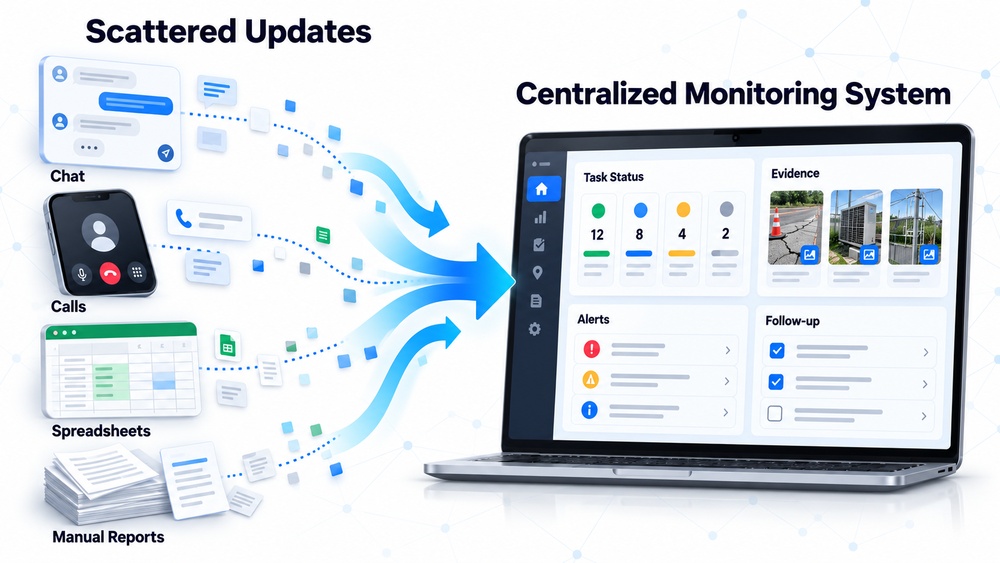
For example, a purchase request may still move through spreadsheets, chat messages, and email even when every application is already hosted in the cloud. The system’s location has changed, but the process used to complete the work remains the same.
2. Existing Problems Can Move to the Cloud as Well
A legacy system that is transferred without modification may continue to carry rigid application structures, duplicate data, irrelevant features, and dependencies on manual processes.
In this situation, the IT team may see a significant change in the infrastructure. However, sales, finance, HR, warehouse, and operations teams may not experience any meaningful improvement in their daily work.
3. Efficiency Improves When Migration Is Followed by System Improvements
Cloud migration should become an opportunity to determine which applications can simply be moved, which need to be reconfigured, which should be modernized, and which are better replaced.
This assessment should be connected to measurable business outcomes, such as:
- Accelerating approvals.
- Reducing repetitive data entry.
- Unifying information across departments.
- Accelerating report preparation.
- Reducing system disruptions.
- Simplifying feature development.
- Keeping cloud costs under control.
The Flexera 2025 State of the Cloud Report found that 84% of respondents considered cloud spend management their organization’s top cloud challenge. Respondents also reported that their cloud budgets exceeded their limits by an average of 17%. These findings show that cloud environments still require continuous management and optimization after migration.
Cloud Expectations vs. Post-Migration Reality
| Expectation | Common Reality After Migration | Cause | What to Evaluate |
| Faster access to data | Teams still search for information across multiple applications | Data is not integrated | Data flows and access permissions |
| Automated processes | Approvals are still managed through chat or email | Legacy workflows have not been updated | Process stages and approval rules |
| Real-time reporting | Data is still consolidated using spreadsheets | Data sources are not connected | Integration and dashboards |
| More stable systems | The causes of disruptions remain difficult to identify | Monitoring is inadequate | Logs, alerts, and incident response procedures |
| Better cost control | Resource usage is difficult to track | Capacity and costs are not regularly evaluated | Usage, capacity, and cost per service |
Moving Legacy Systems Without Making Changes
The first mistake is moving an entire legacy system without assessing whether its applications and processes still meet the company’s needs. A lift-and-shift approach may accelerate migration, but it should not be considered the end of the modernization process.
1. The Same Processes Create the Same Problems
Companies need to examine how work is actually completed, not only where the applications are running. If approvals still involve too many steps, customer data is entered multiple times, or reports still depend on manual consolidation, moving the server will not solve the underlying problem.
Consequently, a company may have modern infrastructure while continuing to experience:
- Long processing times.
- Repetitive data-entry errors.
- Inconsistent information.
- Dependency on specific employees.
- Delayed reporting.
- Difficulty tracking work progress.
2. The Cloud Becomes a New Location for an Old System
Migration without assessment may cause a company to retain applications that are expensive, difficult to integrate, and no longer suitable for the scale of its operations. The cloud merely becomes a new location for running the same limitations.
Before migration, companies should map the following:
- The function and owner of each application.
- The departments that use the application.
- The data entering and leaving the system.
- Dependencies on other systems.
- Security and operational risks.
- Operating and maintenance costs.
- The application’s ability to support business growth.
This mapping can help determine whether an application should be retained, moved, reconfigured, modernized, replaced, or retired.
3. Migration Should Be an Opportunity to Simplify Processes
Process improvements can begin by identifying repetitive data entry, the longest waiting periods, approvals that no longer add value, and tasks that depend heavily on manual follow-ups.
Once the process has been simplified, the company can implement it through digital workflows, clear access permissions, automatic notifications, and monitoring dashboards. The migration and infrastructure management strategy can be developed through Smart IT’s Cloud and DevOps services.
If the main obstacle comes from highly specific operational processes, the company may also consider a Custom ERP system designed around its business requirements.
Overlooking System Integration
The second mistake is migrating applications separately without designing how data and processes should move between them. Every application may already be online, but employees still have to transfer information manually because the systems are not connected.
1. Systems Are Online, but the Data Remains Disconnected
Within one company, the sales team may use a CRM, the operations team may use a project application, HR may use an HRIS, while finance and inventory may use separate systems.
Without cloud system integration, changes made in one application do not automatically update the others. For example, an order confirmed by the sales team may not immediately:
- Update inventory availability.
- Create a delivery request.
- Notify the operations team.
- Prepare an invoice.
- Update the transaction status on the management dashboard.
2. Disconnected Data Keeps Processes Manual
Separate systems force employees to download and upload files, copy and paste information, verify figures, and open multiple applications to complete a single task.
In addition to taking more time, this situation increases the risk of:
- Typing errors.
- Duplicate data.
- Conflicting document versions.
- Delayed updates.
- Inconsistent transaction statuses.
- Decisions based on outdated information.
Integration can be implemented through APIs, middleware, ERP modules, or custom connectors. The appropriate method depends on transaction volume, data update frequency, application capabilities, and security requirements.
3. Efficiency Is Easier to Achieve When Systems Are Connected
Integration enables information to move from one stage to another without being repeatedly re-entered. Operations teams receive updates more quickly, while management can review reports based on more consistent data sources.
Examples of Systems That Should Be Integrated
| Business Area | Systems Used | Problems When Separated | Benefits When Connected |
| Sales and finance | CRM, quotation, and accounting | Invoices are delayed and payment status is difficult to monitor | Invoices can be generated from approved transactions |
| Sales and inventory | CRM, order management, and inventory | Sales teams cannot see the latest stock information | Stock and order information becomes more consistent |
| HR and payroll | Attendance, leave, payroll, and finance | Attendance data must be repeatedly consolidated | Payroll calculations become faster and easier to track |
| Field operations | Mobile application, scheduling, and ERP | Field reports reach the office late | Work progress can be monitored more quickly |
| Management | ERP, CRM, HRIS, and dashboards | KPIs are compiled from multiple files | Dashboards use more consistent cross-departmental data |
If a company wants to unify CRM, accounting, inventory, purchasing, HR, and other business functions on one platform, an Odoo ERP implementation may be an option worth evaluating.

Failing to Prepare Teams for New Ways of Working
The third mistake is focusing only on technology without helping employees adjust the way they work. If users do not understand the new process, they are likely to return to spreadsheets, private chats, or familiar legacy methods.
New Technology Will Not Deliver Maximum Value If Old Workflows Remain
Data sharing, digital approvals, notifications, dashboards, and automation will not deliver their full value if work continues outside the system.
This situation may create two sources of information:
- Official data stored in the system.
- Working data saved by individual employees.
When these two sources do not match, teams must perform additional checks before preparing reports or making decisions.
Teams Need to Understand What Changes in Their Daily Processes
Every user needs to understand the changes in practical terms, including:
- What data they must enter.
- When the data must be updated.
- Who provides approval.
- Which status indicates that a process is complete.
- Which report should be used as the primary reference.
- What access is available based on their responsibilities.
- What procedure to follow when an error occurs.
Communication should be supported by role-based training, concise guidance, and process simulations. Users do not need to learn every feature if their work only requires specific functions.
The Cloud Requires More Structured Working Habits
Consistent usage determines data quality. Companies should therefore establish naming conventions, data-entry formats, update schedules, primary data sources, and error-handling procedures.
After the system has been implemented, evaluate:
- Features that users still do not understand.
- Steps that are still performed outside the system.
- Access permissions that obstruct work.
- Notifications that are not functioning properly.
- New processes that unintentionally create additional work.
AWS explains that cloud operations modernization includes readiness, automation, and integration while considering technology, people, and processes. Changes in working methods are therefore not an optional addition; they are part of a successful migration.

How Can You Tell Whether the Cloud Is Being Underutilized?
The cloud is being underutilized if the technology transition has not produced measurable improvements in processing speed, data quality, employee productivity, system stability, or operational costs.
1. Teams Still Rely Heavily on Manual Follow-Ups
If work only moves forward after someone sends a reminder through chat, email, or telephone, the digital workflow has not been fully optimized. The system should help route tasks, update statuses, send notifications, and remind the appropriate employees according to predefined rules.
2. Reports Still Need to Be Consolidated from Multiple Sources
Cloud technology has not delivered meaningful efficiency if employees still have to download several files, standardize their formats, verify the figures, and combine them every week.
This situation indicates that data sources are not yet integrated, KPI definitions are inconsistent, or the dashboard has not been designed around user requirements.
3. Decisions Remain Slow Because the Data Is Not Ready to Use
Storing data in the cloud is not the same as making it ready for business use. Decisions remain slow if the information is outdated, inconsistent, or can only be understood after being processed again by a specific employee.
Consider a simple simulation. If five departments each spend one hour every week manually synchronizing data, the company uses approximately five working hours per week or 20 working hours per month solely on data synchronization.
This figure does not include the time required to resolve discrepancies or wait for confirmation. Although this simulation is not a universal benchmark, companies can use the same calculation to estimate the cost of manual processes based on the number of departments, reporting frequency, and time required.
What Should Be Evaluated Before or After Cloud Migration?
Companies should evaluate business objectives, processes, integrations, user readiness, security, performance, and costs. These checks need to begin before migration and continue after the applications are running in the cloud.
1. Identify Processes That Are Still Overly Complicated
Map each process from beginning to end, including both working time and waiting time. Identify stages with too many steps, repetitive approvals, unclear validation requirements, and tasks that depend on one specific employee.
Useful questions include:
- Which stage requires the most time?
- What data must be entered more than once?
- Which approvals are no longer necessary?
- Where does work most frequently become delayed?
- Which processes still rely on chat messages or spreadsheets?
2. Identify Systems That Need to Be Connected
Create an inventory of ERP, CRM, HRIS, finance, inventory, e-commerce, field applications, and other systems. Determine what data must be exchanged, the direction of the data flow, the frequency of updates, and which system should serve as the primary source of information.
Not every application needs to be integrated immediately. Prioritize connections that have the greatest effect on core processes or create the most repetitive data entry.
3. Evaluate Whether the Team Is Ready to Use the New Workflow
Ensure that every user has appropriate access, understands their responsibilities, and knows how to report a problem. Monitor whether any processes are still being performed outside the system.
Training should not be limited to the period before launch. Provide follow-up evaluations and support after implementation to address problems that emerge during daily operations.
4. Evaluate Security and Monitoring After the System Goes Live
Companies need to review:
- Role-based access permissions.
- User authentication.
- Activity logging.
- Data backups.
- Recovery procedures.
- System updates.
- Performance monitoring.
- Service disruption alerts.
- Web application and API protection.
- Capacity and cost evaluations.
Applications accessible through the internet have a different risk exposure from locally hosted systems. Application and API protection should therefore be designed from the beginning rather than added only after an incident occurs.
Cloud Migration Readiness Checklist
| Area to Evaluate | Key Question | Risk If Ignored | Follow-Up Action |
| Business objectives | What outcome should improve after migration? | Migration is completed without measurable impact | Define baseline conditions and KPI targets |
| Processes | Which stages are slow or repetitive? | Existing bottlenecks continue | Simplify and automate workflows |
| Applications | Should the application be moved, modernized, or replaced? | Legacy limitations move to the cloud | Select a strategy for each application |
| Integration | Which systems need to exchange data? | Duplicate entry and inconsistent data | Create an integration map and define the primary data source |
| Users | Does the team understand the new workflow and responsibilities? | Users return to manual methods | Provide training and concise guidance |
| Security | Who can access the data, and how is activity monitored? | Excessive access and delayed incident detection | Implement access controls, logging, backups, and protection |
| Operations | Are performance, capacity, and costs being monitored? | Disruptions and wasted resources | Establish monitoring and regular evaluations |
Strategies for Optimizing the Cloud After Migration
Post-migration optimization should focus on architectural alignment, data integration, system stability, security, and business outcomes. Migration is not complete when an application successfully runs in the cloud.
1. Align the Cloud Architecture with Business Requirements
Not every company needs the same cloud architecture. The strategy should consider:
- Company size.
- Application types.
- Transaction volumes.
- User locations.
- Access requirements.
- Security requirements.
- Internal team capabilities.
- Growth plans.
- Budget and usage patterns.
Some applications may only need to be moved to accelerate the transition. Applications that play a critical role in operations may require reconfiguration, modernization, or complete redevelopment.
2. Connect Interdependent Data and Systems
Integration priorities should be based on business impact. Begin with system connections that reduce repetitive input, accelerate core transactions, or provide important data for decision-making.
Integrated data also creates a foundation for automation and AI. Automated systems will not deliver optimal results if the data remains fragmented, incomplete, or defined differently across departments.
3. Use DevOps to Improve Stability and System Development
DevOps connects development and operations through automated testing, more consistent deployment, documented changes, and monitoring.
This approach can help companies:
- Reduce deployment errors.
- Detect disruptions more quickly.
- Maintain consistent application environments.
- Accelerate feature updates.
- Trace changes more easily.
- Improve collaboration between development and operations teams.
Microsoft emphasizes that migration does not end at cutover. Workloads still need to be optimized through performance, cost, monitoring, security, backup, and user-feedback evaluations.
Practical Steps Your Company Can Take
If operations have not improved after cloud migration, the company does not necessarily need to replace every system immediately. Begin with the most frequent obstacles and the issues that have the greatest business impact.
1. Evaluate the Legacy Systems
Create an inventory of applications, data, dependencies, costs, problems, process owners, and business importance. Do not assume every application should use the same migration strategy.
2. Improve Business Processes
Identify repetitive data entry, overly complicated approvals, waiting periods, and tasks that still depend on manual follow-ups.
3. Define Integration Requirements
Prioritize system connections that reduce duplicate input, accelerate core processes, and provide more consistent information.
4. Prepare the Team for Workflow Changes
Define roles, permissions, usage rules, documentation, training, and procedures for handling problems.
5. Establish Success Indicators
Use indicators that can be compared before and after migration, such as:
- Approval completion time.
- Report preparation time.
- Number of repetitive data entries.
- Number of manual tasks.
- System adoption rate.
- Frequency of disruptions.
- Issue-resolution time.
- Cloud cost per application or department.
6. Implement Monitoring and Security
Regularly monitor performance, capacity, costs, activity logs, backups, vulnerabilities, and application availability.
7. Make Improvements Gradually
Review the results and move to the next process based on business impact, risk, and priority. Cloud migration should be treated as a continuous improvement process.
Frequently Asked Questions About Problems After Moving to the Cloud
The following questions commonly arise when a company has moved to the cloud but has not experienced a meaningful improvement in operational efficiency.
1. Why Do Business Operations Still Feel the Same After Moving to the Cloud?
Operations may remain unchanged if the company only moves applications and data without improving processes, integrations, and user workflows. The cloud changes the infrastructure, but efficiency requires changes in how systems and teams work.
2. Does the Cloud Automatically Make a Company More Efficient?
No. The cloud provides scalability, flexibility, access, and services that can support efficiency. The final result still depends on architectural design, application modernization, integration, governance, and user readiness.
3. What Are the Most Common Cloud Migration Mistakes?
Common mistakes include moving legacy systems without assessment, failing to map application dependencies, overlooking data integration, inadequately preparing users, and neglecting post-migration optimization.
4. Why Is System Integration Important in a Cloud Environment?
Integration allows data and process statuses to move between applications. Employees do not need to repeatedly enter information, reconcile multiple files, or wait for updates from another department.
5. How Can a Company Tell Whether It Is Underutilizing the Cloud?
Common signs include manual follow-ups, reports consolidated from multiple sources, inconsistent departmental data, inadequate system monitoring, and no meaningful improvement in processing time.
6. What Should a Company Prepare Before Cloud Migration?
The company should establish business objectives, map applications and dependencies, assess processes, define integration requirements, prepare security and backup plans, train users, and establish success indicators.
7. When Does a Business Need Cloud and DevOps Support?
Cloud and DevOps assistance may be appropriate when a company has many interdependent systems, needs to minimize disruption during migration, struggles to manage performance and costs, or does not yet have sufficient internal expertise.
Conclusion: The Cloud Creates More Value When Supported by the Right Strategy
Problems after moving to the cloud are usually not caused by the technology itself. They often result from legacy systems, disconnected data, and unchanged team workflows. The evaluation should therefore begin with the operational problems that continue after migration.
If processes remain slow, simplify workflows and approvals before adding more technology. If employees still transfer information manually, prioritize system integration. If applications remain unstable or difficult to develop, review the architecture, monitoring, security, and DevOps practices. If users continue returning to old methods, improve training, access permissions, and system usage rules.
By making decisions based on the actual source of the problem, the cloud can evolve from a new location for running applications into a more integrated, stable, secure, and scalable foundation for business operations.
Optimize the Cloud to Improve Your Business Efficiency
If your company has moved to the cloud but operations still feel the same, Smart IT can help evaluate your requirements and prepare a strategy covering Cloud and DevOps, system integration, Custom ERP, AI Automation, and application security.
Each solution can be aligned with your processes, business objectives, and current technology environment so that the cloud genuinely supports operational efficiency and better decision-making. Consult with Smart IT to determine the improvements that are most relevant to your business.
PT SMARTIT MANTAP DIGITAL INDONESIA
Vieloft Ciputra World, Suite 10-01.
Kompleks Superblock, Ciputra World
Jl. Mayjen Sungkono No.89 Surabaya, Jawa Timur, Indonesia 60224
Telepon: +6281130576888 / +628113426391
Email: hello@smart-it.co.id
Facebook: Smart IT Indonesia
LinkedIn: Smart IT Indonesia
Instagram: smartitcoid
Referensi:
1. Flexera. (2025, March 19). New Flexera report finds that 84% of organizations struggle to manage cloud spend. https://www.flexera.com/about-us/press-center/new-flexera-report-finds-84-percent-of-organizations-struggle-to-manage-cloud-spend
2. Google Cloud. (n.d.). What is legacy modernization? Retrieved August 4, 2026, from https://cloud.google.com/discover/what-is-legacy-modernization
3. Microsoft. (n.d.). Optimize workloads after migration. Microsoft Learn. Retrieved August 4, 2026, from https://learn.microsoft.com/en-us/azure/cloud-adoption-framework/migrate/optimize-workloads-after-migration
4. Roy, L., & Lingamallu, P. (n.d.). Modernizing operations in the AWS Cloud. AWS Prescriptive Guidance. Retrieved August 4, 2026, fromhttps://docs.aws.amazon.com/prescriptive-guidance/latest/migration-operations-integration/introduction.html