Cloud Is More Than Just a Trend: It Helps Businesses Stay Prepared for Unexpected Events
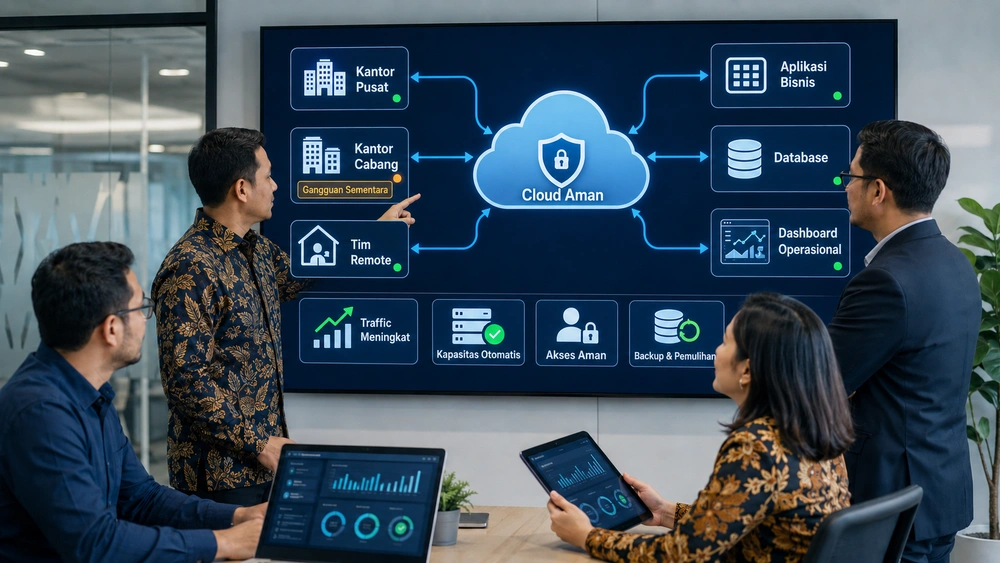
Cloud technology for business readiness is an approach that helps maintain application access, adjust capacity, protect data, and restore operations when business needs change or disruptions occur. However, simply using the cloud does not automatically make infrastructure flexible and secure. Its architecture, access controls, backups, monitoring, and recovery plans must still be designed around the company’s specific needs.
When the number of users increases, team working patterns change, or emergencies disrupt an operational location, companies need technology that can respond without creating new obstacles.
This article discusses how cloud technology can help businesses manage sudden increases in demand, support teams working across multiple locations, maintain operational continuity, and assess their readiness before starting a cloud migration.
Cloud Is Not About Following a Trend, but About Business Readiness
Cloud is more than a technology for storing data online. In the context of business readiness, it provides a foundation for managing capacity, access, development, security, and system recovery more flexibly as a company’s needs evolve.
1. Cloud Helps Businesses Prepare for Change
Cloud computing enables computing resources such as servers, storage, databases, and networks to be provisioned based on demand. Companies can increase capacity when activity rises, provide access for new branches, or prepare application environments without having to build new physical infrastructure from scratch.
For example, when a company opens a new branch, cloud-based systems can provide the local team with access to business applications. Account management, configuration, and service monitoring can also be handled centrally, making expansion less dependent on deploying a server at every branch.
However, this flexibility does not mean every change happens automatically. Companies must still determine which users can access the system, how much capacity each application requires, how systems should be integrated, and what level of availability is needed.
2. Rigid Systems Are More Likely to Become Overwhelmed
Systems that are difficult to scale or heavily dependent on a single location are more likely to experience problems when working patterns and access volumes change. Applications may slow down, transactions may fail, data updates may be delayed, or employees may be unable to access information while working outside the office.
The problem does not necessarily lie only in server specifications. Inefficient applications, unoptimized databases, fragile integrations, or insufficient monitoring can cause even newly deployed infrastructure to become overwhelmed.
For this reason, cloud migration should involve more than moving an existing application to a different server. The application architecture and supporting operational processes should also be evaluated so the organization can take full advantage of cloud flexibility.
3. Technology Readiness Affects Business Speed
Well-prepared technology makes applications and data available when they are needed. Management can review operational conditions more quickly, while employees do not need to wait for files to be sent manually or travel to the office simply to access a particular application.
Technology readiness also influences a company’s ability to:
- Launch new services and features.
- Add users or branch offices.
- Run campaigns that generate high traffic.
- Connect applications across departments.
- Restore services after a disruption.
- Respond to changing customer needs.
A company’s cloud strategy should therefore be connected to specific business objectives, not merely technical targets such as relocating servers or reducing the use of physical hardware.
When Users and Transactions Suddenly Increase, the System Must Keep Up
A scalable cloud system can help companies adjust capacity when user and transaction volumes increase. This preparation is important because surges caused by promotions, peak seasons, registration periods, or expansion can slow applications down or prevent them from processing transactions altogether.
1. Traffic Surges Can Overload Legacy Systems
A surge in traffic causes servers, databases, and integrations to receive more requests at the same time. When demand exceeds available capacity, users may experience longer loading times, timeouts, errors, or failed transactions.
The consequences extend beyond technical issues. Failed transactions can reduce revenue, increase service queues, cause data inconsistencies, and generate more customer service complaints. Management dashboards may also display delayed information when synchronization processes are disrupted.
Situations that companies should anticipate include:
- Promotional campaigns with high traffic.
- Payroll periods.
- E-commerce peak seasons.
- Registration or booking periods.
- The addition of new branches and employees.
- Product or service launches.
- Integrations with external platforms that increase data volumes.
2. Cloud Makes System Capacity More Flexible
Cloud infrastructure allows computing resources, storage, and supporting services to be increased or reduced according to demand. The architecture can use autoscaling to add resources, load balancing to distribute traffic, and caching to reduce repeated requests to the database.
However, business systems do not become scalable automatically just because they are hosted in the cloud. Applications must be designed to run across multiple instances, user sessions must not depend on a single server, and databases must be able to handle increased demand.
Monitoring is also required to track indicators such as:
- CPU and memory usage.
- Application response times.
- The number of requests and active users.
- The percentage of failed transactions.
- Database load and response times.
- The status of integrations with external systems.
Monitoring data can be used to determine when additional capacity is required and which components need to be optimized.

3. Businesses Should Not Wait Until the System Fails
Capacity planning should take place before an expected surge begins. Companies can use historical transaction data, campaign schedules, branch expansion plans, and growth projections to estimate their resource requirements.
Load testing should also be conducted to determine how many users or transactions the system can support. The results help teams identify weaknesses before the application is used under real-world peak conditions.
Cloud and DevOps implementation may include:
- Mapping normal and peak workloads.
- Automating deployment processes.
- Configuring capacity and autoscaling.
- Monitoring performance and availability.
- Setting alerts when indicators exceed established thresholds.
- Testing applications before deployment.
- Regularly evaluating performance and costs.
The following table compares system requirements under normal conditions and during traffic surges:
| Situation | Risk to Legacy Systems | System Requirements | Role of Cloud |
| Stable daily traffic | Capacity may be either excessive or insufficient | Resources aligned with normal demand and routine monitoring | Capacity can be adjusted according to actual usage |
| Major campaign or promotion | Slow applications, timeouts, and failed transactions | Additional capacity, load balancing, and load testing | Supports resource expansion and traffic distribution |
| Peak season | Databases and integrations become overloaded | Database optimization, caching, and observability | Provides resources that can be scaled more easily |
| Branch expansion | Server provisioning and access setup take too long | User provisioning, centralized access, and additional capacity | Simplifies resource provisioning for new locations |
| Service launch | Initial demand is difficult to predict | Real-time monitoring and adjustable capacity | Helps teams respond to changing usage |
When Team Working Patterns Change, System Access Must Remain Reliable
Cloud technology can support system access from the office, branch locations, home, field sites, and other operational locations. However, flexible access must be supported by appropriate identity management, permissions, device controls, and security measures so that convenience does not introduce new risks.
1. Teams Do Not Always Work from the Same Location
Modern working arrangements are increasingly diverse. Managers may need to access dashboards while outside the office, sales teams may retrieve customer data from the field, HR teams may manage employee information across branches, and operational staff may update work statuses directly from customer locations.
If an application can only be used through a particular office computer or network, changing locations can interrupt the workflow. Approvals may be delayed, reports may not be updated promptly, and employees may resort to personal messaging applications or separate files as temporary workarounds.
Before enabling access across locations, companies should map:
- Who needs access.
- Which applications and data they require.
- Where users work.
- Which devices they use.
- When and how frequently they need access.
- The authority assigned to each role.
- Procedures for lost devices or compromised accounts.
2. Cloud Keeps Data and Applications Accessible
Cloud-based systems allow authorized users to access applications through secured connections. Information can be stored and updated centrally, preventing teams from working with multiple conflicting versions of the same data.
This capability is relevant to various business applications, including:
- ERP systems that connect transactions and operations.
- HRIS platforms that manage employee data, attendance, and payroll.
- E-commerce systems that process sales and inventory.
- Field workforce applications that update job statuses.
- Management dashboards that track company performance.
- Approval systems that keep authorization workflows moving.
Cloud access can reduce dependence on a single physical location. However, it still requires an internet connection and alternative procedures for situations in which a user’s network is unavailable.
3. Flexible Access Must Still Be Securely Managed
Access from multiple locations increases the number of endpoints that must be protected. Companies must ensure that each user can access only the data and features required to perform their duties.
Controls that should be prepared include:
- Multi-factor authentication.
- Role-based access control.
- The principle of least privilege.
- Password policies.
- User activity logging.
- Regular account and permission reviews.
- Account deactivation when employees leave.
- Protection for devices used to access the system.
- Application and API security.
Cyber Security is required to manage these risks comprehensively. A Web Application Firewall, or WAF, can also serve as one layer of protection by filtering malicious traffic directed at web applications and APIs.
However, a WAF is not a substitute for application security. Protection must still be implemented in layers through secure development, appropriate configuration, identity controls, patching, monitoring, and incident response.
When an Emergency Occurs, Operations Must Not Stop
Cloud technology can support operational continuity through backups, redundancy, alternative access, monitoring, and system recovery. The required level of readiness should be determined by the potential impact of downtime and how long each business process can remain unavailable.
1. Systems Must Remain Accessible When Needed
Availability refers to the ability of applications and data to remain accessible when required. Infrastructure can improve availability through redundancy, health checks, load balancing, and failover to standby components.
Not every application requires the same high-availability design. A core transaction system may require a higher level of availability than an archival application that is used only a few times a month.
Companies can determine priorities by asking:
- Does downtime immediately stop transactions?
- How many users would be affected?
- Would the disruption interrupt customer service?
- Can the process be completed manually?
- How long can operations continue without the application?
- Could downtime create compliance risks or data loss?
The answers help companies avoid two risks: failing to protect critical systems adequately or deploying unnecessarily expensive architectures for noncritical systems.
2. Data Must Remain Secure and Available
Backups should cover data, applications, configurations, and other important components required for recovery. Storing copies of data alone is insufficient if the business has not determined how much data it can afford to lose and how long recovery can take.
Two targets should be established:
- Recovery Point Objective (RPO): The maximum acceptable amount of data loss. An RPO of one hour means the company needs a mechanism that limits data loss to approximately one hour.
- Recovery Time Objective (RTO): The target time for restoring a service after a disruption. An RTO of four hours means the system should be available again within a maximum of four hours.
Backups should be separated from the primary system, protected through restricted access, monitored, and verified through restoration testing. A backup that has never been tested cannot yet be considered a reliable recovery mechanism.

3. Operations Need a Contingency Plan
A contingency plan explains the actions to take when the primary system becomes unavailable. It should identify which services must be restored first, who is responsible for each action, the escalation path, the communication process, and temporary working procedures.
The urgency of such planning is reflected in the Uptime Institute Global Data Center Survey 2024:
“For the second consecutive year, 54% of respondents said their most recent significant outage cost more than US$100,000. Around one in five consequential outages cost more than US$1 million” (Donnellan et al., 2024, p. 19).
These findings come from data center environments of varying sizes and therefore cannot be directly equated with the downtime costs of every company. Nevertheless, they show that infrastructure disruptions can have serious business consequences when recovery has not been properly prepared.
Contingency plans should be tested through simulations. The purpose is not only to confirm that the technology can be restored, but also to ensure that every team member understands their role when an emergency actually occurs.
The following table can be used as an initial cloud-readiness assessment for emergency situations:
| Emergency Risk | Business Impact | Required Readiness | Initial Action |
| Server or application failure | Transactions and work processes stop | Redundancy, monitoring, and failover | Identify critical applications and their recovery priorities |
| Data is deleted or corrupted | Operational information is lost | Backups, versioning, and restoration testing | Define the RPO, backup schedule, and data retention period |
| Account misuse | Data is exposed or altered without authorization | MFA, least privilege, logging, and access reviews | Audit accounts and role-based permissions |
| Office becomes inaccessible | Teams lose access to the local network | Remote access and alternative working procedures | Test access from a backup location |
| Web application is attacked | Services are disrupted and data is placed at risk | Secure development, monitoring, WAF, and incident response | Map public-facing applications and their protection layers |
| Provider or region experiences an outage | Some services become unavailable | Risk-based redundancy and recovery strategy | Evaluate dependencies and failover options |
System Flexibility Is Part of Business Resilience
Technology flexibility supports business resilience when systems can adjust their capacity, access locations, integrations, and recovery methods. These benefits become meaningful only when changes can be made in a controlled manner without compromising security, stability, or cost management.
1. Flexible Systems Adapt More Easily to Change
Cloud technology can help companies provision new environments, add resources, automate deployments, and connect applications through APIs. These changes can be managed more effectively when companies have proper documentation, testing procedures, and configuration management.
This flexibility is useful when a company:
- Adds users and branches.
- Experiences increased transaction volumes.
- Changes how its teams work.
- Integrates new software.
- Requires additional features.
- Restores services after a disruption.
Flexibility is therefore more than a technological feature. It represents the company’s ability to maintain critical processes when circumstances change.
2. The Effects of an Unprepared System Quickly Become Apparent
Infrastructure that cannot adapt easily may slow service delivery, delay decision-making, and increase manual work. IT teams may then spend more time resolving recurring problems than developing solutions that support growth.
Customers may also feel the impact. Slow applications, failed transactions, inaccurate inventory information, or delayed responses can reduce the quality of the customer experience.
The cause-and-effect relationship is clear: when capacity and data flows do not keep pace with operational changes, more processes must be handled manually. The more manual intervention is required, the greater the risk of delays and errors.
3. Cloud Must Be Designed Around Business Needs
There is no single cloud strategy that suits every company. Businesses may use public cloud, private cloud, hybrid cloud, or a combination of services depending on their data, regulatory requirements, access patterns, budget, and internal capabilities.
Cost management must also be planned from the outset. The Flexera 2024 State of the Cloud Report identifies cloud spending management as the leading challenge for organizations. According to the report, 29% of respondents spend more than US$12 million annually on public cloud services.
This figure primarily reflects large organizations and should not be treated as a cost benchmark for every business. However, it demonstrates that cloud flexibility still requires budgeting, usage monitoring, and resource optimization to ensure that costs remain proportionate to the value delivered.
Cloud architecture should consider:
- Normal and peak workload patterns.
- Availability targets.
- Integration requirements.
- User locations and volumes.
- Data sensitivity.
- RPO and RTO.
- Budget and cost controls.
- The internal team’s management capabilities.
What Should Businesses Assess Before Using Cloud Technology?
Before adopting or migrating to the cloud, companies should evaluate their access requirements, workload patterns, security, backups, integrations, costs, and team capabilities. An initial assessment prevents the organization from moving existing problems into a new environment without addressing their underlying causes.
1. Assess Team Access Requirements
Identify who needs access, which applications they use, where they work, and how frequently access is required. The assessment should also cover devices, connection quality, authentication, and account deactivation procedures.
2. Assess the Risk of Sudden Increases in Users or Transactions
Map promotional campaigns, peak seasons, payroll dates, registration periods, and branch expansion plans that could increase traffic. Historical data and business projections can be used to design load-testing scenarios and determine capacity requirements.
3. Assess Security and Data Backup Requirements
Classify data according to its sensitivity, then define the necessary access controls, encryption, retention, logging, monitoring, backups, and recovery requirements. Companies must also understand how security responsibilities are shared between the cloud service provider and the customer.
4. Assess Integration Readiness with Other Systems
Map connections between the cloud and ERP, HRIS, e-commerce, payment systems, field applications, and dashboards. Review data formats, APIs, authentication, synchronization frequency, and the actions to take when one application becomes unavailable.
Integration with a Custom ERP or Custom Enterprise Software solution can be designed so that data flows follow the company’s operational processes, rather than merely connecting applications at a technical level.
The following checklist can be used to assess a company’s initial readiness:
| Assessment Area | Key Question | Risk If Overlooked | Follow-Up Action |
| Team access | Who accesses the system, from where, and with what authority? | Access may be blocked or permissions may be too broad | Create a matrix of users, roles, locations, and access requirements |
| System workload | When are users and transactions likely to increase? | Applications may slow down during critical periods | Prepare capacity projections and conduct load testing |
| Security | Which data is sensitive, and which controls are required? | Data breaches and account misuse | Implement MFA, least privilege, encryption, logging, and monitoring |
| Backup | What RPO and RTO can the business accept? | Data may be lost or recovery may take too long | Establish a backup schedule and conduct restoration testing |
| Integration | Which systems exchange data with one another? | Data may be duplicated, delayed, or inconsistent | Map APIs, dependencies, and failure-handling procedures |
| Cost | Which resources account for the highest usage? | Spending may become difficult to control | Establish budgets, tagging, cost alerts, and regular reviews |
| Team | Who manages the system and responds to incidents? | Response may be slow and responsibilities unclear | Assign system owners and define escalation paths |
Practical Steps Businesses Can Take
Cloud implementation can begin gradually, starting with the applications that are most critical or most frequently disrupt operations. A phased approach allows companies to measure performance, security, costs, and recovery capabilities before expanding cloud adoption.
1. Assess Access Requirements
Map users, working locations, devices, applications, and the level of authority required.
2. Map the Risk of Demand Surges
Identify periods when traffic is likely to increase and estimate the required capacity.
3. Identify Critical Systems
Prioritize applications based on how downtime would affect transactions, customer service, compliance, and employees’ work.
4. Prepare Security and Backups
Implement access controls, monitoring, backups, and appropriate RPO and RTO targets.
5. Review Integrations
Document the relationships between cloud services, ERP, HRIS, e-commerce, field applications, payment systems, and dashboards.
6. Begin with a Measurable Workload
Select one application or process for a pilot project instead of migrating the entire infrastructure at once.
7. Conduct Testing
Run load tests, restoration tests, incident simulations, and access tests from alternative locations.
8. Monitor Costs and Performance
Compare costs with resource usage, performance, availability, and the operational benefits delivered.
9. Evaluate Results Before Expanding
Use the pilot project results to improve the design before migrating additional applications.
Frequently Asked Questions About Cloud and Business Readiness
The following questions commonly arise when companies begin considering cloud technology as part of their system and operational readiness.
1. Is cloud just a technology trend?
No. Cloud can support business readiness by allowing companies to manage capacity, access, development, and recovery more flexibly. However, these benefits depend on the architecture, security, monitoring, and operational processes supporting it.
2. When should a business start considering cloud technology?
Cloud is worth considering when a company requires access across multiple locations, faster capacity expansion, system integration, more consistent deployment, or a more structured recovery process. The decision should still be based on business needs, risks, costs, and team readiness.
3. How does cloud help when user and transaction volumes increase?
Cloud provides resources that can be expanded as needed and supports capabilities such as autoscaling and load balancing. To use these capabilities effectively, the application, database, and integrations must also be designed to handle increased demand.
4. Is cloud suitable for remote or hybrid teams?
Yes. Cloud-based systems can help authorized users access applications and data from different locations. Companies must still provide strong authentication, permission controls, device protection, secure connections, and activity monitoring.
5. What role does cloud play during an emergency?
Cloud can support redundancy, backups, alternative access, and service recovery. Companies still need a contingency plan, RPO and RTO targets, failover procedures, and simulations to ensure that the plan can be executed effectively.
6. Does cloud automatically make systems more secure?
No. Cloud providers secure the infrastructure within the scope of their services, while companies remain responsible for configurations, accounts, permissions, data, applications, and how the services are used. Cloud security follows a shared-responsibility model.
7. What should a business assess before migrating to the cloud?
Assess the business objectives, application inventory, access requirements, traffic patterns, data classification, security, backups, integrations, costs, team capabilities, and recovery targets. The results provide a foundation for deciding which workloads to migrate and how the migration should be phased.
Conclusion: Cloud Is More Than Technology—It Helps Businesses Stay Prepared for Change
When a company begins experiencing increases in users, transaction growth, branch expansion, or a greater need for access across locations, cloud technology can make application capacity and access more flexible. If the main priority is maintaining services during disruptions, the cloud strategy should focus on backups, redundancy, monitoring, and clearly defined RPO and RTO targets.
Companies do not need to migrate every application at once. Start with the system that is most critical or most frequently disrupts operations, run a pilot project, and measure its performance, security, cost, and recovery capabilities. If the results meet the established targets, cloud adoption can gradually be expanded to other processes.
With this approach, cloud technology is implemented in response to genuine business needs. The objective is not merely to relocate infrastructure, but to ensure that access, data, integrations, and operational processes continue functioning when conditions change.
Build a Cloud System That Can Keep Up with Business Change
If your business wants to be better prepared for change, Smart IT can help design Cloud and DevOps strategies, system integrations, Cyber Security, WAF, and business software tailored to your operational processes. Consult Smart IT to determine the right cloud architecture, security controls, integrations, and implementation stages so that your systems remain ready for both business growth and unexpected events.
PT SMARTIT MANTAP DIGITAL INDONESIA
Vieloft Ciputra World, Suite 10-01.
Kompleks Superblock, Ciputra World
Jl. Mayjen Sungkono No.89 Surabaya, Jawa Timur, Indonesia 60224
Telepon: +6281130576888 / +628113426391
Email: hello@smart-it.co.id
Facebook: Smart IT Indonesia
LinkedIn: Smart IT Indonesia
Instagram: smartitcoid
References
1. Donnellan, D., Lawrence, A., Bizo, D., Judge, P., O’Brien, J., Davis, J., Smolaks, M., Williams-George, J., & Weinschenk, R. (2024). Uptime Institute global data center survey 2024. Uptime Institute Intelligence. https://datacenter.uptimeinstitute.com/rs/711-RIA-145/images/2024.GlobalDataCenterSurvey.Report.pdf
2. Flexera. (2024, March 12). Flexera 2024 State of the Cloud: Managing cloud spending is the top challenge of cloud computing, while AI, FinOps, security and sustainability demand attention. https://www.flexera.com/about-us/press-center/flexera-2024-state-of-the-cloud-managing-spending-top-challenge
Related Articles
 Cloud and DevOps
How to Monitor Field Team Progress Without Checking Each Person via Chat
 Cloud and DevOps
Already Moved to the Cloud, but Still Facing the Same Business Problems? These Common Mistakes May Be the Cause
 Cloud and DevOps