How to Monitor Field Team Progress Without Checking Each Person via Chat
To monitor field team progress without checking each person’s chat, companies need to:
- Centralize tasks and updates in one system.
- Establish standardized job statuses.
- Define the data and evidence required for each update.
- Display progress through a dashboard.
- Create notifications for important conditions.
- Establish an escalation process for field issues.
- Use historical data for operational evaluation.
With a single source of data, supervisors can perform real-time field team monitoring and prioritize delayed, pending, or decision-dependent tasks without contacting each field worker individually through chat.
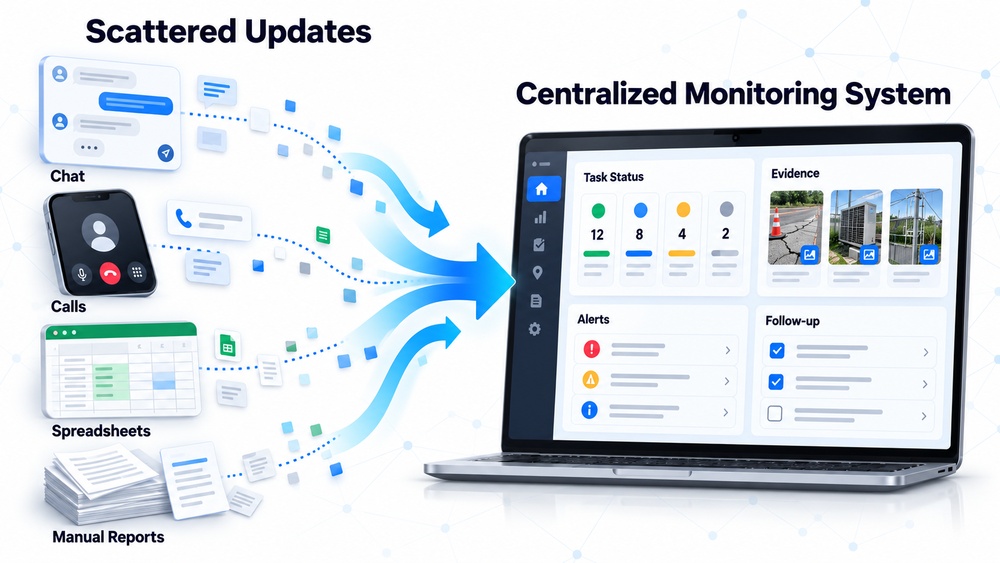
Updates scattered across chats, phone calls, spreadsheets, and end-of-day reports need to be consolidated into a structured workflow. This allows relevant parties to view the status, evidence, issues, and follow-up actions for each task directly.
[Visual recommendation: A comparison between information scattered across chats, phone calls, spreadsheets, and manual reports and data flowing into a centralized monitoring system.]
Centralize Tasks and Updates in One System
The monitoring process should begin by establishing a single source of data. This system should store task assignments, progress updates, issues, supporting evidence, and work results.
Each task should contain at least:
- Task number or identifier
- Field worker’s name or person in charge (PIC)
- Customer or work object
- Task location
- Schedule and deadline
- Work priority
- Instructions or targets
- Latest status
- Issues and follow-up actions
Chat can still be used for discussions. However, status changes and work results should be recorded in the main system. If important information is only stored in private or group chats, the company will still need to find and consolidate it manually.
For example, a supervisor managing 20 field workers may need to request up to 20 separate updates without a centralized source of data. With a monitoring system, the supervisor only needs to review tasks that have not been updated, are overdue, or have encountered issues. The number in this example illustrates an operational scenario and is not an industry average.
Establish Standardized Job Statuses
Standardized statuses help supervisors understand the position of each task without having to interpret vague updates such as “in progress,” “almost done,” or “everything is fine.”
Possible statuses include:
- Assigned
- Accepted by Field Worker
- Traveling to Location
- In Progress
- On Hold
- Awaiting Confirmation
- Awaiting Inspection
- Completed
- Return Visit Required
Microsoft Learn’s explanation of the work order lifecycle states that statuses indicate the current position of a task within its lifecycle. A status change can also update related data or trigger the next process.
The number and names of statuses do not need to be the same for every company. They should follow the company’s workflow so that each status indicates the current condition and the next required action.
1. Each Status Must Have a Clear Meaning
Define the conditions under which a task can enter or leave each status. For example, “On Hold” should indicate that the task cannot continue for a specific reason and requires follow-up, rather than simply meaning that the task is unfinished.
2. Every Status Change Must Have a Basis
An “In Progress” status may require a check-in or recorded start time. An “On Hold” status should include a reason, while a “Completed” status should be supported by work results or evidence.
The following table connects each status with the required action and supporting evidence.
| Status | Meaning | Field Worker’s Action | Data or Evidence | Follow-Up Party |
| Assigned | The task has been created | Review the task details | Acceptance confirmation | Dispatcher |
| In Progress | Work has started | Update the start time | Check-in or initial notes | Supervisor |
| On Hold | Work has encountered an obstacle | Explain the issue | Reason, photo, or request for assistance | Supervisor/relevant PIC |
| Completed | The work target has been achieved | Submit the final result | Photo, form, or inspection result | Reviewer |
Define the Data That Must Be Updated from the Field
Monitoring does not need to record every activity performed by field workers. Companies only need to define the updates that help supervisors understand current conditions and make decisions.
Data that may be monitored includes:
- Work start time
- Work location, when required
- Progress or work stage
- Interim results
- Issues identified
- Requests for assistance or approval
- Schedule changes
- Final results
- Required follow-up actions
Data requirements should be adjusted to the type of team. A sales team may need to record visit outcomes and customer follow-ups, while technicians may need to report inspection results, actions taken, and required components.
Connect Every Progress Update with Relevant Evidence
Status updates should include sufficient context so supervisors do not need to contact field workers again to understand what happened.
Supporting evidence may include:
- Photos before and after the work
- Inspection result forms
- Notes on actions taken
- Customer signatures
- Measurement or testing results
- Supporting documents
- Work location and time, when relevant
Evidence does not need to be excessive. Its format should follow the results that need to be verified and the risks associated with the work. To understand its application, read how to maintain complete evidence of field team activities.
Display Progress Through an Operational Dashboard
A field team dashboard should consolidate data from all field workers so the operational team does not need to open individual reports.
Information displayed on the dashboard may include:
- Number of tasks scheduled for the day
- Tasks that have not started
- Tasks currently in progress
- Completed tasks
- Overdue tasks
- On-hold tasks and their reasons
- Issues that have not been followed up
- Tasks awaiting inspection
- Progress by team, region, or location
1. Daily Dashboard for Supervisors
A daily dashboard should prioritize active tasks, delays, issues, field workers currently carrying out assignments, and actions that need to be taken that day.
2. Summary Dashboard for Management
A management dashboard can display target achievement, delay trends, recurring issues, regional performance, team capacity, and completion quality. The information shown should reflect the decisions management needs to make so the company can use data to manage field teams, rather than merely collecting reports.

Use Notifications for Conditions That Require Attention
Supervisors do not need to receive notifications for every activity. Routine updates can remain visible on the dashboard, conditions requiring review can generate alerts, and critical issues should be escalated immediately.
| Condition | Notification Level | Recipient | Delivery Time | Expected Action |
| Task has not been accepted | Reminder | Field worker | Before the scheduled time | Accept or confirm the task |
| Work has passed its deadline | Alert | Supervisor | When the deadline is exceeded | Review the cause |
| Critical issue | Escalation | Manager/PIC | Immediately | Make a decision |
| Evidence is incomplete | Reminder | Field worker | Before the task is closed | Complete the report |
| Follow-up is overdue | Alert | Supervisor | When the follow-up deadline is exceeded | Assign a PIC and required action |
Every notification should have a clear recipient and expected action. Without both, alerts only add more information without accelerating problem resolution.
Establish an Escalation Process for Field Issues
Visibility alone is not enough if a visible issue does not have a PIC, response deadline, and resolution process.
An escalation process should answer:
- Which issues must be reported?
- Who receives the information first?
- Who has the authority to make a decision?
- What is the response time limit?
- What happens if the issue remains unresolved?
- How is the final status recorded?
| Type of Issue | Priority | Initial PIC | Escalation Party | Response Time | Required Decision |
| Customer is unavailable | Medium | Dispatcher | Supervisor | Based on the visit schedule | Reschedule the visit |
| Site access is restricted | High | Supervisor | Operations manager | Immediately | Continue or reschedule |
| Insufficient supplies | High | Logistics | Relevant manager | Based on the internal SLA | Procurement or return visit |
| Additional damage identified | High | Technician/supervisor | Authorized party | Immediately | Approve further action |
Monitor by Exception Instead of Checking Every Field Worker
The purpose of a monitoring system is not to observe every movement of the team. It is to identify work that has deviated from the plan.
Supervisors can prioritize:
- Tasks that have not started according to schedule
- Work that is taking longer than expected
- Tasks that are repeatedly placed on hold
- Unsuccessful visits
- Reports with incomplete evidence
- Issues that have not received a response
- Follow-up actions that have passed their deadlines
- Differences between reported status and actual results
Tasks progressing according to plan remain recorded on the dashboard. Supervisors can then focus their attention on work that requires assistance or a decision.
Use Historical Data for Operational Evaluation
Historical data helps companies identify patterns affecting operational efficiency rather than only viewing the current situation.
The evaluation may include:
- On-time completion rate
- Average duration by task type
- Percentage of completed and on-hold tasks
- Most common causes of delays
- Locations with recurring issues
- Number of return visits
- Response time to field issues
- Workload by team or region
- Completeness of reports and supporting evidence
These indicators should be used to identify process bottlenecks and support requirements, rather than solely to evaluate individual performance.
Real-Time Monitoring Still Depends on Data Updates
Real-time monitoring does not mean management can automatically know field conditions without any input. New information only becomes visible after field workers or connected systems update statuses, submit reports, or synchronize data.
Companies need to ensure that:
- Field workers understand when statuses must be updated
- The data entry process is not unnecessarily long
- Connectivity and synchronization support actual field conditions
- Statuses have consistent definitions
- Incoming data is reviewed and followed up
- Integrations between systems do not experience unnecessary delays
Microsoft Learn’s explanation of offline data updates states that data recorded while a device is offline will be synchronized once an internet connection becomes available. Therefore, the dashboard should display the latest update time or synchronization status so outdated data is not mistaken for the current condition.

Implement the Monitoring System Gradually
Implementation can begin with one workflow or team before being expanded across the entire operation.
- Map the current workflow.
- Identify information that is still scattered across different channels.
- Define the required statuses, data, and evidence.
- Select one team or task type for a pilot project.
- Set up the dashboard and notification rules.
- Test the reporting and escalation processes.
- Evaluate the data entry burden on field workers.
- Improve the workflow before expanding its use.
The new system does not need to reproduce every existing habit. Steps that do not produce important data or support decision-making can be simplified.
Field Team Monitoring Evaluation Checklist
Use the following checklist to assess whether monitoring still relies too heavily on chat and manual reports:
- Are all tasks recorded in one system?
- Does every task have a person in charge (PIC), schedule, location, and target?
- Does each job status have a clear definition?
- Do field workers know when to update their status?
- Does each progress update include relevant data or evidence?
- Can supervisors identify overdue tasks?
- Do critical issues trigger an alert?
- Does every issue have a person responsible for follow-up?
- Are reports still transferred manually from chat to spreadsheets?
- Can data be viewed by team, region, and period?
- Can supervisors monitor progress without contacting every field worker?
- Is historical data used for operational evaluation?
Frequently Asked Questions About Field Team Monitoring
The monitoring system should be adjusted to the type of work, number of field workers, operational coverage, and decisions the company needs to make.
1. Does the Company Need to Stop Using Chat Completely?
No. Chat can still be used for discussions, but task statuses, reports, issues, and work results should be stored in the main system.
2. Does Real-Time Monitoring Always Require GPS?
No. The need for GPS depends on the importance of location validation and the nature of the work.
3. Should Every Field Worker Activity Be Monitored?
No. Monitoring should focus on tasks, progress, results, issues, and information required for decision-making.
4. How Often Should Field Workers Update Their Status?
The frequency should follow the work stages and operational urgency, such as when a task is accepted, work begins, an issue is identified, or the task is completed.
5. What Should the Company Do If Field Workers Rarely Update Their Status?
Evaluate the clarity of the rules, length of the data entry process, ease of system use, connectivity, training, and whether supervisors actually use the submitted updates.
6. When Does a Company Need a Dedicated Monitoring System?
A company needs a dedicated system when the number of tasks, field workers, locations, issues, and reports becomes difficult to monitor through chat, phone calls, or spreadsheets.
Conclusion
If supervisors still need to contact field workers individually, begin by centralizing task data and standardizing job statuses. If the data is already centralized but issues are still handled too slowly, add dashboards, notifications, and escalation workflows so the operational team can focus directly on work that requires action.
Monitor Field Team Progress from One System
If progress updates, reports, and field issues are still scattered across multiple channels, Smart IT can help you map your workflow and design a more integrated monitoring system. Discuss your requirements for Fieldmate, a mobile system, custom software, or system integration based on your company’s operational needs.
PT SMARTIT MANTAP DIGITAL INDONESIA
Vieloft Ciputra World, Suite 10-01.
Kompleks Superblock, Ciputra World
Jl. Mayjen Sungkono No.89 Surabaya, Jawa Timur, Indonesia 60224
Telepon: +6281130576888 / +628113426391
Email: hello@smart-it.co.id
Facebook: Smart IT Indonesia
LinkedIn: Smart IT Indonesia
Instagram: smartitcoid
References
1. Microsoft. (n.d.). Work order lifecycle and system statuses. Microsoft Learn.
https://learn.microsoft.com/en-us/dynamics365/field-service/work-order-status-booking-status
2. Microsoft. (2025). Work offline and update offline data. Microsoft Learn.
https://learn.microsoft.com/en-us/dynamics365/field-service/mobile/work-offline
Related Articles
 Cloud and DevOps
Cloud Is More Than Just a Trend: It Helps Businesses Stay Prepared for Unexpected Events
 Cloud and DevOps
Already Moved to the Cloud, but Still Facing the Same Business Problems? These Common Mistakes May Be the Cause
 Cloud and DevOps